

Most RAG tutorials stop after embedding a few documents into a vector database and asking a simple question. Real-world AI systems are far more complicated.
In a production-grade Retrieval Augmented Generation (RAG) application, retrieval quality matters more than the LLM itself. If retrieval is weak, hallucination increases. If context quality is poor, even the best model produces mediocre responses.
In this article, we will build a complete RAG pipeline using:
- Spring AI
- Elasticsearch
- Ollama
- Spring Batch
- Hybrid Search (BM25 + Vector Search)
- Query Rewriting
- Citations
- Metadata Enrichment
The application recommends Indian recipes based on user prompts such as:
“Suggest a spicy North Indian paneer recipe under 30 minutes.”
Instead of directly asking the LLM, we first retrieve relevant recipes from Elasticsearch and then pass only the relevant context to the model.
The goal of this article is not just to show a demo application, but to explain the reasoning behind each architectural decision so you can build scalable and accurate AI systems with Spring AI.
Application Architecture
Below is the high-level architecture of the RAG application.
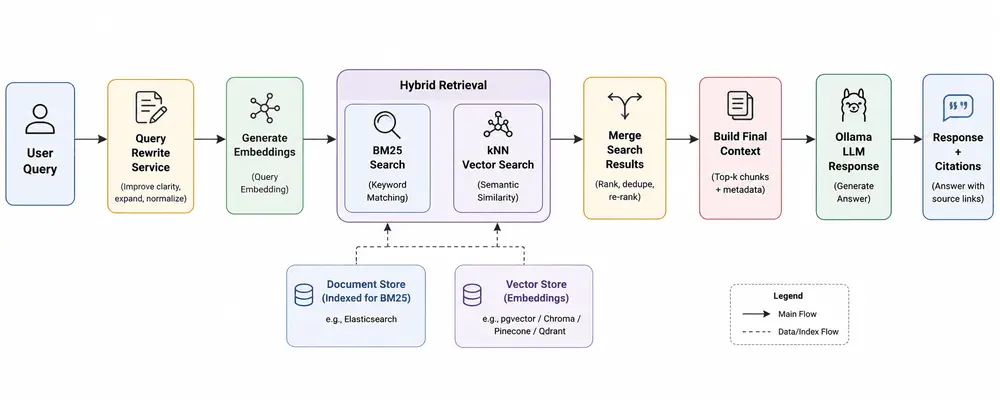
One of the biggest mistakes developers make while building RAG systems is over-focusing on the LLM and under-investing in retrieval quality. In reality, retrieval quality is the foundation of an accurate RAG pipeline.
Dataset Used for Recipe Recommendation
The dataset contains Indian recipe information with metadata fields such as:
- Recipe Name
- Ingredients
- Cuisine
- Total Preparation Time
- Instructions
- Image URL
- Ingredient Count
Sample CSV structure:
TranslatedRecipeName,
TranslatedIngredients,
TotalTimeInMins,
Cuisine,
TranslatedInstructions,
URL,
Cleaned-Ingredients,
image-url,
Ingredient-count
During ingestion, we enrich the document with metadata so future filtering and reranking become easier.
Configuring Spring AI and Ollama
The project uses Ollama locally for both embeddings and chat completion.
From application.yaml:
spring:
  ai:
    vectorstore:
      elasticsearch:
        initialize-schema: false
        index-name: indian-recipes
        dimensions: 768

    ollama:
      base-url: http://localhost:11434

      embedding:
        options:
          model: nomic-embed-text

      chat:
        options:
          model: qwen2.5:3b
          temperature: 0.5
          num-ctx: 8192
Here we are using:
- nomic-embed-text for vector embeddings
- qwen2.5:3b for response generation
The embedding dimension is configured as 768, which must match the embedding model output dimension.
A lower temperature helps reduce randomness and keeps responses more factual.
Why Metadata Matters in RAG Applications
Most beginner RAG applications only store plain text chunks. That approach works for demos but becomes limiting very quickly.
In this project, metadata is indexed separately to support:
- Filtering by cuisine
- Filtering by preparation time
- Ingredient-based retrieval
- Citation generation
- Future reranking pipelines
The document model looks like this:
@Data
public class RecipeVectorDocument {

    private String id;
    private String content;
    private float[] embedding;
    private String recipeName;
    private String cuisine;
    private Integer prepTime;
    private Integer ingredientCount;
    private String ingredients;
    private String sourceUrl;
    private String imgUrl;
}
This metadata becomes extremely powerful later when implementing filtering and reranking.
Document Ingestion with Spring Batch
Instead of writing a one-time script, this application uses Spring Batch for ingestion.
This is important because production systems require:
- Retry capability
- Chunk processing
- Parallel execution
- Monitoring
- Scalability
The ingestion pipeline converts CSV rows into vector documents.
The processor enriches documents before indexing:
public class RecipeProcessor implements ItemProcessor<RecipeCsvRow, RecipeVectorDocument> {

    @Override
    public RecipeVectorDocument process(RecipeCsvRow row) {

        String content = buildContent(row);

        RecipeVectorDocument doc = new RecipeVectorDocument();

        doc.setId(UUID.randomUUID().toString());
        doc.setContent(content);
        doc.setRecipeName(row.getRecipeName());
        doc.setCuisine(row.getCuisine());
        doc.setPrepTime(row.getTotalTimeInMins());
        doc.setIngredientCount(row.getIngredientCount());
        doc.setIngredients(row.getCleanedIngredients());
        doc.setSourceUrl(row.getUrl());
        doc.setImgUrl(row.getImgUrl());
        return doc;
    }
}
Notice that we are not only storing embeddings. We are preserving structured metadata separately.
Creating Searchable Context
One of the most important design decisions in RAG systems is how documents are transformed before embedding generation.
In this application, recipe data is converted into natural language format:
private String buildContent(RecipeCsvRow row) {

    return """
        Recipe: %s

        Ingredients: %s

        Cuisine: %s

        Instructions: %s

        Preparation Time: %d minutes
        """
            .formatted(
                    row.getRecipeName(),
                    row.getIngredients(),
                    row.getCuisine(),
                    row.getInstructions(),
                    row.getTotalTimeInMins()
            );
}
This improves semantic understanding during embedding generation.
Instead of embedding isolated fields separately, the model understands the recipe as a coherent piece of information.
Batch Embedding Generation
Generating embeddings one by one is inefficient.
The ingestion pipeline batches embedding generation for better throughput.
EmbeddingResponse response =
        embeddingModel.embedForResponse(contents);
This is significantly faster compared to generating embeddings individually for each row.
The embeddings are then indexed into Elasticsearch using bulk indexing.
client.bulk(bulk.build());
Bulk indexing is critical for large-scale ingestion pipelines.
Why Hybrid Search is Better Than Pure Vector Search
Pure vector search often misses exact keyword matches.
Example:
"Paneer butter masala under 20 minutes"
Vector search may retrieve semantically similar recipes but not necessarily exact matches for "paneer butter masala".
Similarly, BM25 keyword search alone misses semantic understanding.
Hybrid search combines the strengths of both approaches.
- BM25 handles lexical matching
- Vector search handles semantic understanding
This project implements both.
Implementing Semantic Search with Elasticsearch kNN
The semantic retrieval flow generates embeddings for the user query and performs kNN search.
float[] queryVector = embeddingModel.embed(query);
Elasticsearch kNN search:
elasticsearchClient.search(s -> s

        .index("indian-recipes")

        .knn(k -> k
                .field("embedding")
                .queryVector(vector)
                .k(5)
                .numCandidates(50)
        ),

        RecipeVectorDocument.class
);
Here:
- k(5) defines the final nearest neighbors
- numCandidates(50) improves retrieval quality by exploring more vectors internally
If you are new to Elasticsearch vector search, refer this detailed article on:
Elasticsearch kNN Search and BM25 Search with Spring Boot
Implementing BM25 Keyword Search
Keyword search is equally important.
elasticsearchClient.search(s -> s

        .index("indian-recipes")

        .query(q -> q
                .match(m -> m
                        .field("content")
                        .query(query)
                )
        )

        .size(5),

        RecipeVectorDocument.class
);
BM25 is excellent for exact ingredient names, recipe names and cuisine-specific matching.
Merging Hybrid Search Results
The application merges semantic and keyword search results.
public List<RecipeVectorDocument> hybridSearch(String query)
        throws IOException {

    List<RecipeVectorDocument> semantic =
            esService.semanticSearch(query);

    List<RecipeVectorDocument> keyword =
            esService.keywordSearch(query);

    Map<String, RecipeVectorDocument> merged =
            new LinkedHashMap<>();

    semantic.forEach(doc ->
            merged.put(doc.getId(), doc));

    keyword.forEach(doc ->
            merged.put(doc.getId(), doc));

    return merged.values()
            .stream()
            .limit(8)
            .toList();
}
Using LinkedHashMap helps preserve insertion order while removing duplicates.
In production systems, this layer can later evolve into:
- Weighted hybrid ranking
- Reciprocal Rank Fusion (RRF)
- Cross-encoder reranking
- Metadata-aware reranking
Improving Retrieval with Query Rewriting
User queries are often incomplete or ambiguous.
Example:
"Something spicy with paneer"
Query rewriting helps convert vague prompts into retrieval-friendly queries.
The project uses a dedicated query rewriting service.
public String rewrite(String query) {

    return queryRewriteChatClient.prompt()
            .user(query)
            .call()
            .content();
}
The rewritten query is used only for retrieval. The original user query is still preserved while generating the final response.
This is an important architectural decision because retrieval optimization and response generation are two different concerns.
Generating the Final RAG Prompt
Once documents are retrieved, the application builds the final prompt.
String context = buildContext(docs);

String prompt = buildUserPrompt(query, context);
The context is constructed from retrieved documents:
private String buildContext(List<RecipeVectorDocument> docs) {

    return docs.stream()
            .map(RecipeVectorDocument::getContent)
            .collect(Collectors.joining("\n\n"));
}
Only relevant recipes are injected into the final prompt.
This is the core principle behind Retrieval Augmented Generation.
Generating Citations
Citations are extremely important in AI applications because they improve trust and traceability.
The application extracts source URLs from retrieved documents.
private List<String> buildCitations(
        List<RecipeVectorDocument> docs) {

    return docs.stream()
            .map(RecipeVectorDocument::getSourceUrl)
            .distinct()
            .toList();
}
This allows users to verify where recommendations originated from.
Reducing Cost and Latency with Semantic Caching
Production AI applications should not repeatedly invoke the LLM for semantically identical queries.
A semantic cache can drastically reduce:
- LLM latency
- Inference cost
- Repeated token generation
You can integrate Redis-based semantic caching into this RAG pipeline.
Refer this article for complete implementation:
Semantic Caching with Redis and Spring Boot
Monitoring Token Usage and AI Cost
Observability becomes critical as your AI traffic grows.
You should monitor:
- Prompt tokens
- Completion tokens
- Latency
- Retrieval quality
- LLM response times
Refer this article for implementing token analytics and observability in Spring AI:
Spring AI Token Usage Analytics
Running the RAG Application
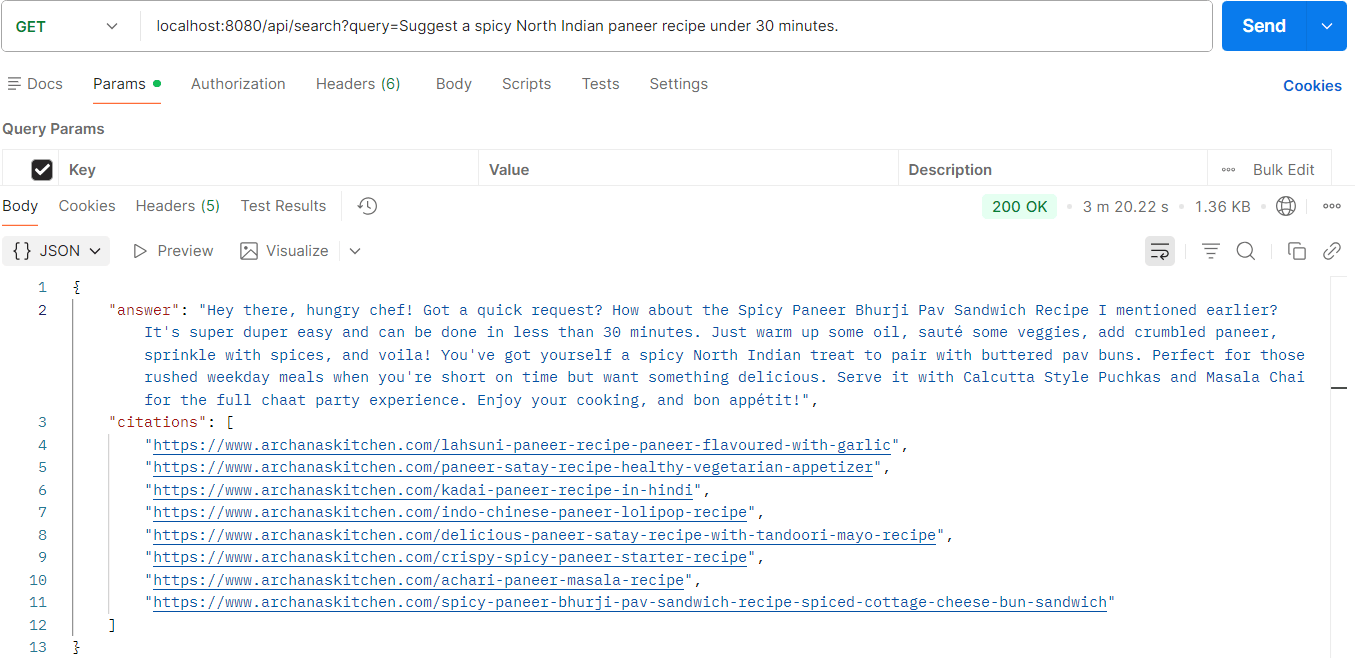
Now it's time to test the app and find out the power of RAG.
    public RagResponse search(String query) throws IOException {
        String rewritten = queryRewriteService.rewrite(query);

        List<RecipeVectorDocument> docs = ragService.hybridSearch(query);
        log.info("Fetched {} docs from elastic", docs.size());

        String context = buildContext(docs);
        //rewritten query is only for retrieval
        String prompt = buildUserPrompt(query, context);
        String answer = chatClient.prompt()
                .user(prompt)
                .call()
                .content();
        List<String> citations = buildCitations(docs);
        return new RagResponse(answer, citations);
    }
Production Improvements You Should Implement Next
This application already demonstrates a strong production-oriented RAG architecture. However, retrieval systems continuously evolve.
Here are the next improvements you should consider.
1. Metadata Filtering
Since metadata is already indexed separately, Elasticsearch filters can be added for:
- Cuisine filtering
- Preparation time filtering
- Ingredient filtering
Example:
"South Indian recipes under 20 minutes."
2. Cross Encoder Reranking
Hybrid search improves retrieval quality significantly, but reranking can improve it even further.
A reranker evaluates retrieved documents against the query more deeply and rearranges results based on semantic relevance.
3. Metadata Extraction Pipelines
Instead of manually storing metadata, LLMs can extract structured metadata automatically during ingestion.
4. Chat History
Current retrieval is stateless. Chat memory can help preserve conversational continuity.
Example:
"Suggest another similar recipe."
Without memory, the model loses prior context.
Final Thoughts
Building a production-grade RAG system is much more than connecting an LLM to a vector database.
Real-world AI systems require:
- Strong retrieval pipelines
- Hybrid search
- Metadata indexing
- Query optimization
- Citation support
- Efficient ingestion
- Observability
Spring AI combined with Elasticsearch provides an excellent ecosystem for building scalable enterprise AI applications.
In the next article of this series, we will further improve this RAG pipeline using:
- Metadata extraction
- Elasticsearch filters
- Reranking
- Chat history
- Advanced retrieval optimization
If you are serious about building enterprise AI applications with Spring AI, retrieval engineering is the skill you should focus on the most.
