

Retrieval-Augmented Generation (RAG) is becoming one of the most practical approaches for building AI-powered applications on top of private enterprise knowledge.
Instead of relying only on the pretrained knowledge of an LLM, a RAG system retrieves relevant contextual information from your own documents and injects it into the prompt before generating the final response.
In this tutorial, we will build a complete Spring AI RAG application using:
- Spring Boot 4
- Spring AI
- PGVector
- PostgreSQL
- Ollama
- PDF ingestion
- Semantic vector search
This architecture is extremely useful for building AI-powered search engines, knowledge bases, documentation assistants and SEO-focused content indexing systems.
In our previous article, we built a similar RAG application using ChromaDB:
Build a Spring AI RAG App with ChromaDB
Once this retrieval layer is ready, you can extend the same implementation to build a conversational chatbot using Spring AI:
Build an AI Chat Application using Spring AI
Local AI Infrastructure Setup
Before building the RAG pipeline, we need a local AI infrastructure for:
- Running PostgreSQL with PGVector
- Managing the database using pgAdmin
- Running local LLMs and embedding models using Ollama
We will use Docker Compose to provision the entire stack locally.
services:

  # PostgreSQL + pgvector
  postgres:
    image: pgvector/pgvector:pg16

    container_name: spring-ai-rag-postgres

    environment:
      POSTGRES_DB: spring_ai_rag
      POSTGRES_USER: postgres
      POSTGRES_PASSWORD: postgres

    ports:
      - "5432:5432"

    command: >
      postgres
      -c shared_buffers=256MB
      -c max_connections=200

    volumes:
      - postgres_data:/var/lib/postgresql/data

    restart: unless-stopped

    healthcheck:
      test: ["CMD-SHELL", "pg_isready -U postgres -d spring_ai_rag"]
      interval: 10s
      timeout: 5s
      retries: 5


  #  pgAdmin
  pgadmin:
    image: dpage/pgadmin4:latest

    container_name: spring-ai-rag-pgadmin

    environment:
      PGADMIN_DEFAULT_EMAIL: admin@local.dev
      PGADMIN_DEFAULT_PASSWORD: admin

    ports:
      - "5050:80"

    depends_on:
      postgres:
        condition: service_healthy

    volumes:
      - pgadmin_data:/var/lib/pgadmin

    restart: unless-stopped


  #  Ollama
  ollama:
    image: ollama/ollama:latest

    container_name: spring-ai-rag-ollama

    ports:
      - "11434:11434"

    volumes:
      - ollama_data:/root/.ollama

    restart: unless-stopped


volumes:
  postgres_data:
  pgadmin_data:
  ollama_data:
Start the infrastructure using:
docker compose up -d
This setup gives us:
- PostgreSQL + PGVector for vector storage and semantic search
- pgAdmin for database management
- Ollama for running local chat and embedding models
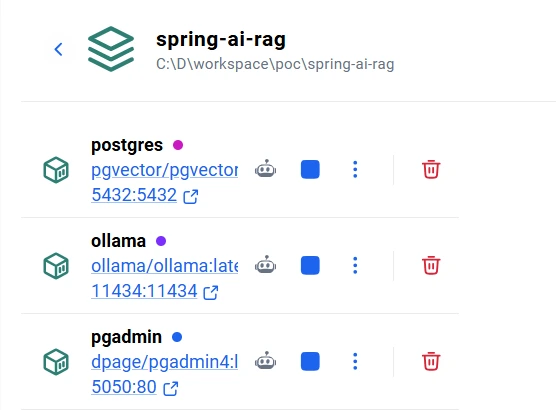
Running the entire stack locally is extremely useful for building private, offline and cost-effective AI applications without depending on external AI APIs.
Project Dependencies
We are using Spring Boot 4 with Spring AI 2.0.0-M5.
<properties>
    <java.version>17</java.version>
    <spring-ai.version>2.0.0-M5</spring-ai.version>
</properties>
The following dependencies are required for:
- Ollama integration
- PGVector vector store
- PDF ingestion
- Apache Tika document parsing
<dependencies>

    <dependency>
        <groupId>org.springframework.boot</groupId>
        <artifactId>spring-boot-starter-webmvc</artifactId>
    </dependency>

    <dependency>
        <groupId>org.springframework.boot</groupId>
        <artifactId>spring-boot-starter-validation</artifactId>
    </dependency>

    <dependency>
        <groupId>org.springframework.ai</groupId>
        <artifactId>spring-ai-pdf-document-reader</artifactId>
    </dependency>

    <dependency>
        <groupId>org.springframework.ai</groupId>
        <artifactId>spring-ai-starter-model-ollama</artifactId>
    </dependency>

    <dependency>
        <groupId>org.springframework.ai</groupId>
        <artifactId>spring-ai-starter-vector-store-pgvector</artifactId>
    </dependency>

    <dependency>
        <groupId>org.springframework.ai</groupId>
        <artifactId>spring-ai-tika-document-reader</artifactId>
    </dependency>

    <dependency>
        <groupId>org.postgresql</groupId>
        <artifactId>postgresql</artifactId>
    </dependency>

</dependencies>
Setting up PGVector using PostgreSQL
Instead of using a separate vector database, we will use PostgreSQL with the pgvector extension.
PGVector allows PostgreSQL to store embeddings and perform similarity search directly inside the database.
Start PostgreSQL and Ollama using Docker Compose
services:

  postgres:
    image: pgvector/pgvector:pg16

    container_name: spring-ai-rag-postgres

    environment:
      POSTGRES_DB: spring_ai_rag
      POSTGRES_USER: postgres
      POSTGRES_PASSWORD: postgres

    ports:
      - "5432:5432"

  ollama:
    image: ollama/ollama:latest

    container_name: spring-ai-rag-ollama

    ports:
      - "11434:11434"
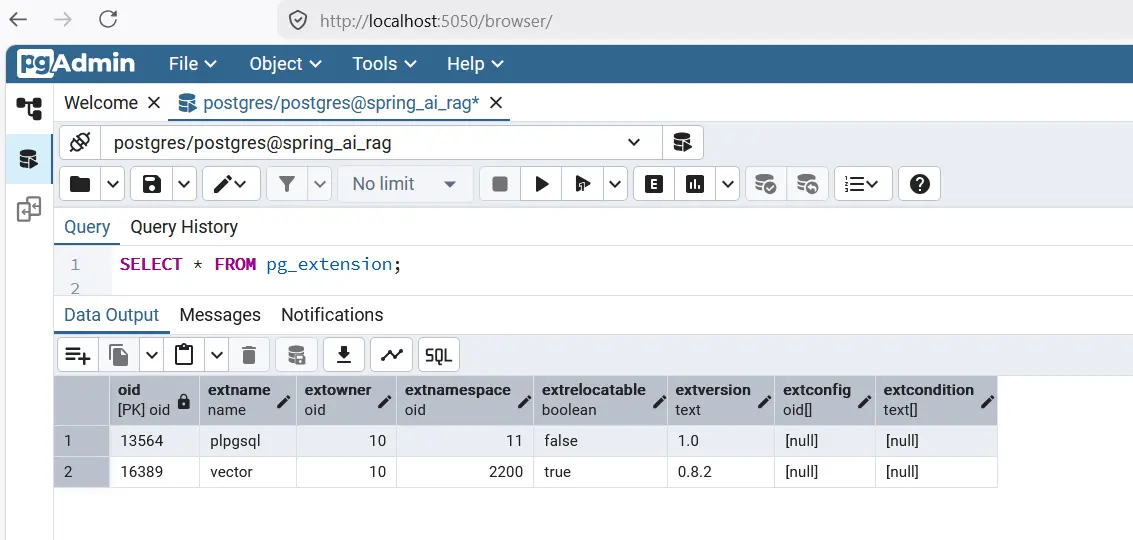
Enable pgvector Extension
After PostgreSQL starts, enable the vector extension manually.
CREATE EXTENSION IF NOT EXISTS vector;
Create Vector Table
We are using a 768-dimensional embedding model.
CREATE TABLE document_embedding (
    id UUID PRIMARY KEY,
    content TEXT,
    metadata JSON,
    embedding VECTOR(768)
);
Create Vector Index
HNSW indexing significantly improves vector similarity search performance.
CREATE INDEX document_embedding_embedding_idx
ON document_embedding
USING hnsw (embedding vector_cosine_ops);
Pull Ollama Models
Since Ollama is running inside Docker, we need to pull the embedding and chat models.
docker exec -it spring-ai-rag-ollama ollama pull nomic-embed-text
docker exec -it spring-ai-rag-ollama ollama pull llama3.2
Spring AI Configuration
The following configuration connects Spring AI with PostgreSQL, PGVector and Ollama.
spring:
  application:
    name: spring-ai-rag

  datasource:
    url: jdbc:postgresql://localhost:5432/spring_ai_rag
    username: postgres
    password: postgres

  ai:
    vectorstore:
      pgvector:
        initialize-schema: false
        table-name: document_embedding
        dimensions: 768

    ollama:
      base-url: http://localhost:11434

      embedding:
        options:
          model: nomic-embed-text

      chat:
        options:
          model: llama3.2
          temperature: 0.7
          num-ctx: 8192
Here:
- nomic-embed-text generates vector embeddings
- llama3.2 generates conversational responses
- document_embedding stores vectorized chunks
Building the ChatClient Configuration
We configure a reusable Spring AI ChatClient with a strict system prompt.
This is important for reducing hallucinations and forcing the LLM to answer only from retrieved context.
@Configuration
@RequiredArgsConstructor
public class ChatClientConfig {

    private static final String SYSTEM_PROMPT = """
            You are a helpful AI assistant.
            Answer the user's question ONLY using the provided context.
            If the answer is not present in the context, say:
            "I could not find relevant information."
            Do not make up or assume information.
            """;

    @Bean
    public ChatClient chatClient(ChatModel chatModel) {
        return ChatClient.builder(chatModel)
                .defaultSystem(SYSTEM_PROMPT)
                .build();
    }

}
Building the Document Ingestion Pipeline
The ingestion layer is responsible for:
- Reading PDF files
- Extracting text
- Chunking content
- Generating embeddings
- Storing vectors in PGVector
DocumentIngestionService
@Slf4j
@Service
@RequiredArgsConstructor
public class DocumentIngestionService {

    private static final int CHUNK_SIZE = 500;
    private static final int MIN_CHUNK_SIZE_CHARS = 350;
    private static final long MAX_FILE_SIZE = 10 * 1024 * 1024;

    private final VectorStore vectorStore;

    public int ingestFile(MultipartFile file) {
        validateFile(file);

        String filename = Optional.ofNullable(file.getOriginalFilename())
                .orElse("unknown");

        String contentType = Optional.ofNullable(file.getContentType())
                .orElse("application/octet-stream");

        long fileSize = file.getSize();

        String documentId = UUID.randomUUID().toString();

        log.info("Starting document ingestion: filename={} contentType={} size={} bytes documentId={}"
                , filename, contentType, fileSize, documentId);

        try {
            Resource resource = toResource(file, filename);

            List<Document> documents = isPdf(filename, contentType)
                    ? readPdf(resource)
                    : readWithTika(resource);

            enrichMetadata(documents, documentId, filename, contentType, fileSize);

            return splitAndStore(documents, filename);

        } catch (IOException ex) {
            log.error("Failed to ingest file '{}'", filename, ex);

            throw RagAppException.internalError(
                    "Failed to ingest file: " + filename,
                    ex
            );
        }
    }
}
PDF Reader Configuration
We use Spring AI PDF reader with page-level extraction.
private List<Document> readPdf(Resource resource) {

    var config = PdfDocumentReaderConfig.builder()
            .withPageExtractedTextFormatter(
                    ExtractedTextFormatter.builder()
                            .withNumberOfBottomTextLinesToDelete(3)
                            .withNumberOfTopPagesToSkipBeforeDelete(1)
                            .build())
            .withPagesPerDocument(1)
            .build();

    return new PagePdfDocumentReader(resource, config).get();
}
This helps preserve page-level context while performing vector retrieval.
Chunking Documents
Large documents are split into semantic chunks before generating embeddings. Adding chunk-level metadata is useful for debugging and citations.
private int splitAndStore(List<Document> documents, String source) {
	var splitter = TokenTextSplitter.builder()
                .withChunkSize(CHUNK_SIZE)
                .withMinChunkSizeChars(MIN_CHUNK_SIZE_CHARS)
                .withMinChunkLengthToEmbed(5)
                .withMaxNumChunks(10_000)
                .withKeepSeparator(true)
                .build();

    List<Document> chunks = splitter.apply(documents);

	for (int i = 0; i < chunks.size(); i++) {
		Document chunk = chunks.get(i);
		chunk.getMetadata().put("chunkIndex", i);
	}
	vectorStore.add(chunks);
}
Chunking is one of the most important parts of any RAG system because it directly impacts retrieval quality.
Store Embeddings in PGVector
vectorStore.add(chunks);
Spring AI automatically:
- Generates embeddings using Ollama
- Stores vectors inside PostgreSQL
- Persists metadata alongside vectors
Document Ingestion API
We expose a multipart upload endpoint for ingesting PDF files.
@Slf4j
@RestController
@RequestMapping("/api/documents")
@RequiredArgsConstructor
public class DocumentController {

    private final DocumentIngestionService ingestionService;

    @PostMapping(value = "/ingest", consumes = MediaType.MULTIPART_FORM_DATA_VALUE)
    public ResponseEntity<DocIngestionResponse> ingestDocument(@RequestParam("file") @NotNull MultipartFile file) {

        int chunks = ingestionService.ingestFile(file);

        return ResponseEntity.ok(DocIngestionResponse.builder()
                .source(file.getOriginalFilename())
                .chunksStored(chunks)
                .message("Successfully ingested %d chunks from '%s'"
                        .formatted(chunks, file.getOriginalFilename()))
                .build());
    }
}
Building the Retrieval Layer
The RAG retrieval pipeline performs:
- Similarity search in PGVector
- Retrieval of relevant chunks
- Prompt augmentation
- LLM response generation
RAG Service
@Service
@RequiredArgsConstructor
@Slf4j
public class RagService {

    private final VectorStore vectorStore;
    private final ChatClient chatClient;

    public String ask(String query) {

        log.info("Processing RAG query: {}", query);

        List<Document> documents = vectorStore.similaritySearch(
                SearchRequest.builder()
                        .query(query)
                        .topK(5)
                        .build()
        );

        if (documents == null || documents.isEmpty()) {
            return "No relevant information found.";
        }

        String context = documents.stream()
                .map(doc -> """
                        Source: %s
                        Content:
                        %s
                        """.formatted(
                        doc.getMetadata().get("source"),
                        doc.getText()
                ))
                .collect(Collectors.joining("\n\n"));

        String userPrompt = buildUserPrompt(context, query);

        return chatClient.prompt()
                .user(userPrompt)
                .call()
                .content();
    }
}
Prompt Template
We externalize the user prompt using Spring AI PromptTemplate.
private String buildUserPrompt(String context, String query) {

    PromptTemplate template = new PromptTemplate(
            new ClassPathResource("prompts/rag-user-prompt.st")
    );

    return template.render(Map.of(
            "context", context,
            "query", query
    ));
}
This keeps prompts maintainable and reusable.
RAG Chat API
We expose a query endpoint for performing semantic retrieval.
@Slf4j
@RequiredArgsConstructor
@RestController
@RequestMapping("/api/rag")
public class ChatController {

    private final RagService ragService;

    @GetMapping("/ask")
    public String ask(@RequestParam String query) {
        return ragService.ask(query);
    }

}
Testing the RAG Application
Step 1: Ingest PDF
POST /api/documents/ingest
Upload a PDF file using Postman.
Step 2: Query the System
GET /api/rag/ask?query=What is Spring AI?
Spring AI will:
- Generate query embeddings
- Search PGVector using cosine similarity
- Retrieve relevant chunks
- Inject context into prompt
- Generate grounded answers using Ollama
Advisor Based RAG in Spring AI
The same retrieval process can be achieved with the help of QuestionAnswerAdvisor Advisors provided by Spring AI and the code looks cleaner.
Add below dependency - spring-ai-advisors-vector-store in pom.xml.
<dependency>
	<groupId>org.springframework.ai</groupId>
	<artifactId>spring-ai-advisors-vector-store</artifactId>
</dependency>
Now refactor chatclient to use advisor based prompt.
public String ask(String query) {

	log.info("Processing RAG query: {}", query);

	return chatClient.prompt()
			.user(query)
			.advisors(buildAdvisors())
			.call()
			.content();
}
Spring AI will internally perform the retrieval from the vectorstore on your behalf and build the context for the prompt that user has provided. Here, we have completely removed the PromptTemplate based implementation using QuestionAnswerAdvisor advisors.
private List<Advisor> buildAdvisors() {
	List<Advisor> advisors = new ArrayList<>();

	advisors.add(QuestionAnswerAdvisor.builder(vectorStore)
			.searchRequest(SearchRequest.builder()
					.topK(5)
					.similarityThreshold(0.6)
					.build())
			.build());
	return advisors;
}
Why Use PGVector for RAG?
PGVector is becoming increasingly popular because it allows teams to build vector search systems directly on top of PostgreSQL.
This removes the need for maintaining a separate vector database while still providing:
- Semantic similarity search
- Vector indexing
- Metadata filtering
- Transactional consistency
- Operational simplicity
For SEO-focused AI systems, semantic retrieval enables:
- Improved contextual indexing
- Knowledge graph style retrieval
- Better long-tail query matching
- Context-aware AI answer generation
- Content enrichment pipelines
Adding Citations and Metadata in Spring AI RAG Response
In production-grade RAG applications, returning only the AI-generated answer is often not sufficient. Users usually want to know which document or source was used by the LLM to generate the response. This is where citations become extremely useful.
Spring AI provides access to the retrieved vector documents through the QuestionAnswerAdvisor.RETRIEVED_DOCUMENTS metadata entry. We can use this to expose document metadata such as filename, document ID, content type, ingestion timestamp, page number, chunk ID, and more.
Instead of directly calling .content(), we can retrieve the complete ChatResponse object and extract the retrieved documents from its metadata.
public RagResponse ask(String query) {

    log.info("Processing RAG query: {}", query);

    var response = chatClient.prompt()
            .user(query)
            .advisors(buildAdvisors())
            .call()
            .chatResponse();

    String answer = response.getResult().getOutput().getText();

    List<Document> documents = response.getMetadata()
            .get(QuestionAnswerAdvisor.RETRIEVED_DOCUMENTS);

    List<RagResponse.Citation> citations = extractCitation(documents);

    return RagResponse.builder()
            .answer(answer)
            .citations(citations)
            .build();
}
We can then extract the document metadata and convert it into citation objects:
private List<RagResponse.Citation> extractCitation(List<Document> documents) {

    return documents.stream()
            .map(doc -> {

                RagResponse.Citation citation =
                        new RagResponse.Citation();

                citation.setSource(
                        (String) doc.getMetadata().get("source"));

                citation.setDocumentId(
                        (String) doc.getMetadata().get("documentId"));

                citation.setContentType(
                        (String) doc.getMetadata().get("contentType"));

                citation.setIngestedAt(
                        (String) doc.getMetadata().get("ingestedAt"));

                return citation;
            })
            .toList();
}
Below is the response DTO used for returning both the generated answer and its citations:
@Data
@Builder
public class RagResponse {

    private String answer;
    private List<Citation> citations;

    @Data
    public static class Citation {

        private String source;
        private String documentId;
        private String contentType;
        private String ingestedAt;
    }
}
Now the API response contains both the AI-generated answer and the source metadata used during retrieval:
{
  "answer": "Spring AI supports Retrieval Augmented Generation using QuestionAnswerAdvisor.",
  "citations": [
    {
      "source": "spring-ai-docs.pdf",
      "documentId": "doc-101",
      "contentType": "application/pdf",
      "ingestedAt": "2026-05-12T07:20:30Z"
    }
  ]
}
This approach significantly improves transparency and trustworthiness in AI applications because users can now verify the origin of the generated response. In enterprise AI systems, citations are commonly used for auditability, hallucination reduction, compliance tracking, and source attribution.
You can further enhance this implementation by storing additional metadata such as page number, chunk ID, embedding version, or content hash during document ingestion. On top of this you can also track the token usage whci I have explained here - Spring AI token usage analytics.
Conclusion
In this tutorial, we built a complete Retrieval-Augmented Generation (RAG) application using Spring AI, PostgreSQL, PGVector and Ollama.
We implemented:
- PDF ingestion
- Document chunking
- Embedding generation
- PGVector similarity search
- Prompt augmentation
- Spring AI ChatClient integration
This architecture forms the foundation for building:
- AI chatbots
- Enterprise search engines
- Knowledge assistants
- Semantic indexing platforms
- Context-aware AI applications
The complete source code can be found at Github here.
In upcoming tutorials, you can extend this implementation further by adding:
- Chat memory
- Streaming responses
- Redis caching
- Metadata filtering
- Hybrid search
- Conversational RAG
