

Large Language Models are great at reasoning and generating natural language, but they do not have access to your private business data. If a user asks:
- What is my monthly salary?
- How much did I spend on Food last month?
- Give me a summary of my finances.
The model cannot answer these questions accurately without accessing external systems.
This is where Spring AI Tool Calling becomes extremely powerful. Instead of allowing the model to hallucinate, Spring AI enables the LLM to invoke Java methods as tools. These tools can fetch live data from databases, APIs, or enterprise systems and return grounded responses.
In this tutorial, we'll build a Finance Assistant powered by:
- Spring AI 2.0
- Ollama (Qwen3:8B)
- PostgreSQL
- JDBC Chat Memory
- Streaming Responses
- Tool Calling
What is Spring AI Tool Calling?
Tool Calling allows an LLM to invoke Java methods when additional information is required to answer a question. Instead of generating a response immediately, the model can:
- Analyze the user request.
- Identify a suitable tool.
- Extract parameters.
- Execute the Java method.
- Use the returned result to generate the final answer.
For example:
User:
How much did I spend on Food last month?
The model cannot know the answer itself.
Instead it:
1. Determines a financial lookup is required.
2. Extracts category=Food.
3. Resolves "last month" into actual dates.
4. Calls a tool.
5. Uses tool output to answer.
This transforms an LLM from a text generator into an intelligent application orchestrator.
Benefits include:
- Eliminates hallucinations
- Provides real-time data access
- Enables enterprise integrations
- Makes AI applications deterministic
- Allows multi-step reasoning workflows
For business applications, tool calling is often more important than prompt engineering.
Project Architecture
Architecture Diagram:
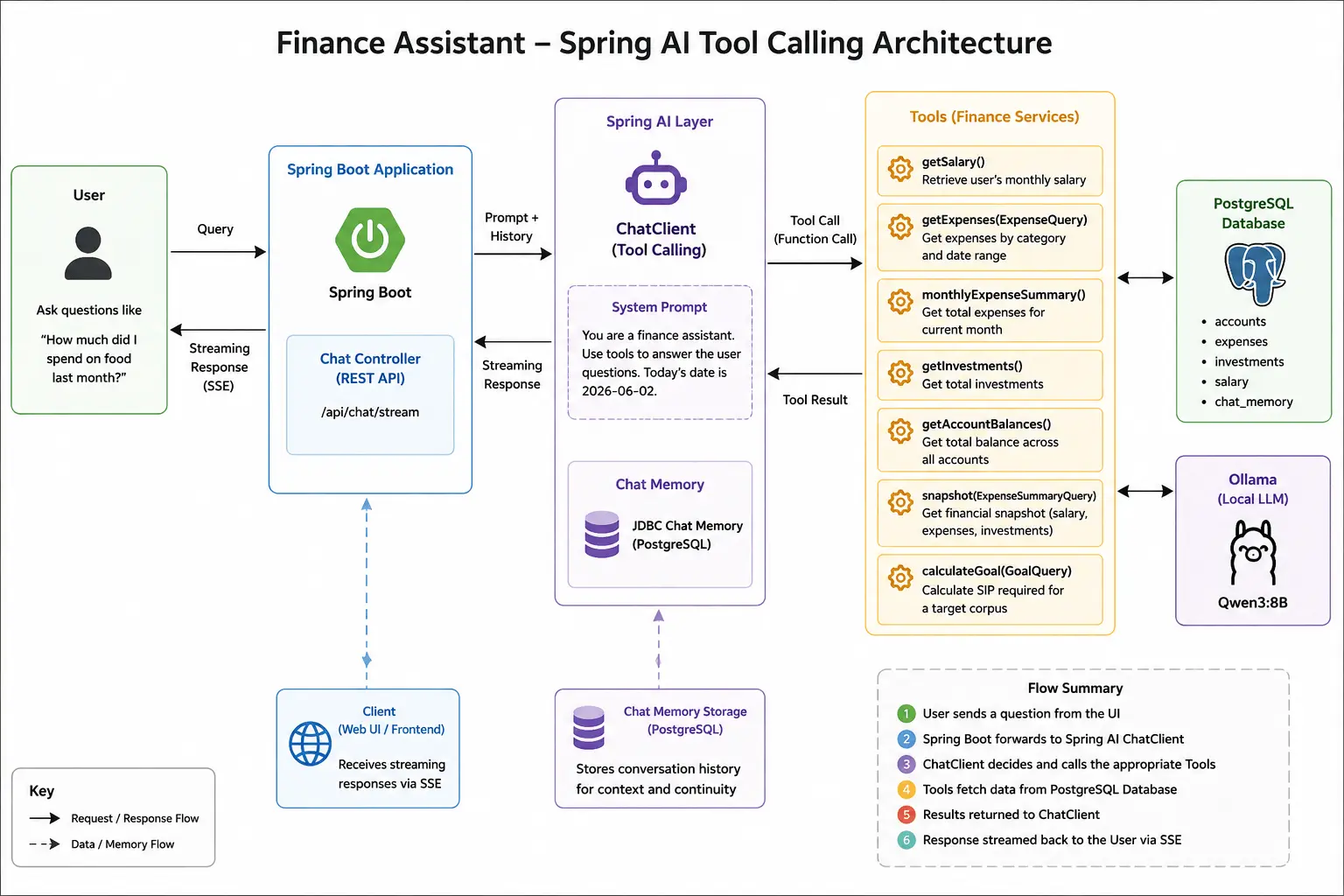
The model decides when a tool should be executed. Spring AI automatically performs the tool orchestration.
Spring AI + Ollama Setup
The application uses Ollama running locally.
application.yaml
spring:
  application:
    name: finance-assistant

  ai:
    ollama:
      base-url: http://localhost:11434
      connection-timeout: 60s
      read-timeout: 300s
      chat:
        options:
          model: qwen3:8b
          keep_alive: 30m

    chat:
      memory:
        repository:
          jdbc:
            initialize-schema: always
Key observations:
- Qwen3:8B is used as the local model.
- JDBC Chat Memory schema is auto-created.
- PostgreSQL stores both finance data and conversation history.
  datasource:
    url: jdbc:postgresql://localhost:5432/fin-assist
    username: postgres
    password: postgres
    hikari:
      maximum-pool-size: 10
      minimum-idle: 2
      connection-timeout: 30000
      idle-timeout: 600000
      max-lifetime: 1800000
Creating Finance Tools
The heart of tool calling is the tool implementation. Spring AI exposes tools using the @Tool annotation.
When you register tools: Spring AI scans all methods annotated with @Tool and automatically converts them into tool definitions that can be understood by the LLM. What makes this particularly powerful is that the model never directly accesses your database.
Expense Lookup Tool
@Tool(description = "Retrieve total expenses for a given category between two dates.")
public ExpenseInfo getExpenses(ExpenseQuery query) {
    BigDecimal amount = expenseRepository.findExpenses(
            query.category(),
            LocalDate.parse(query.fromDate()).atStartOfDay(),
            LocalDate.parse(query.toDate()).atStartOfDay());

    log.info("Tool Invoked: getExpenses({}, {}, {})",
        query.category(),
        query.fromDate(),
        query.toDate()
    );

    return new ExpenseInfo(amount, "INR");
}
Interesting part:
The LLM automatically generates:
{
  "category": "Food",
  "fromDate": "2026-05-01",
  "toDate": "2026-05-31"
}
from a natural language prompt such as:
How much did I spend on Food last month?
No manual parsing is required.
Salary Tool
@Tool(description = "Retrieve user's monthly salary")
public SalaryInfo getSalary(){
    Salary salary = Optional.ofNullable(salaryRepository.findTopByOrderByIdDesc()).orElse(null);

    BigDecimal monthlySalary = Objects.isNull(salary) ? BigDecimal.ZERO : salary.getMonthlySalary();
    return new SalaryInfo(monthlySalary, "INR");
}
The model learns from the description when this tool should be used.
Investment Tool
@Tool(description = "Get all investments")
public List<Investment> getInvestments() {
    return investmentRepository.findAll();
}
Financial Snapshot Tool
@Tool(description = "Retrieve a financial summary containing current salary," +
        "current month expenses, and total investments.")
public FinancialSnapshot summary(ExpenseSummaryQuery query) {

    SalaryInfo salary = getSalary();
    ExpenseInfo expenseInfo = monthlyExpenseSummary(query);

    BigDecimal investments = investmentRepository.findInvestments();

    return new FinancialSnapshot(
            salary.monthlySalary(),
            expenseInfo.expenseAmount(),
            investments);
}
This demonstrates a powerful pattern:
A tool can internally orchestrate multiple data retrieval operations and expose a higher-level business capability.
Adding PostgreSQL-backed Tool Data
Our finance assistant is grounded using PostgreSQL.
Database Schema
create table expenses (
    id bigint generated by default as identity,
    amount numeric(38,2),
    category varchar(255),
    expense_date timestamp(6),
    merchant varchar(255),
    primary key (id)
);

create table investments (
    id bigint generated by default as identity,
    amount numeric(38,2),
    date timestamp(6),
    investment_type varchar(255),
    primary key (id)
);

create table salary (
    id bigint generated by default as identity,
    monthly_salary numeric(38,2),
    primary key (id)
);
Unlike RAG systems that retrieve embeddings, tool calling retrieves structured data directly from transactional systems.
A useful comparison can be made with my Spring AI RAG implementation: Spring AI RAG Pipeline
RAG is ideal for knowledge retrieval. Tool calling is ideal for operational and transactional data.
Building the Finance Assistant
The most important configuration resides in ChatConfig.
@Bean
ChatClient financeChatClient(
        ChatClient.Builder builder,
        FinanceTools financeTools,
        ChatMemory chatMemory) {

    return builder
            .defaultTools(financeTools)
            .defaultAdvisors(
                    MessageChatMemoryAdvisor
                            .builder(chatMemory)
                            .build()
            )
            .build();
}
This single line:
.defaultTools(financeTools)
registers every @Tool method as a callable capability. When the model determines a tool is required, Spring AI automatically:
- Builds the tool schema.
- Sends it to the model.
- Receives tool invocation requests.
- Executes the Java method.
- Returns tool results.
- Continues the conversation.
Implementing JDBC Chat Memory
Conversation memory is implemented using PostgreSQL.
@Bean
ChatMemory chatMemory(ChatMemoryRepository repository) {
    return MessageWindowChatMemory.builder()
            .chatMemoryRepository(repository)
            .maxMessages(20)
            .build();
}
This gives the assistant awareness of previous messages. The backing table:
    CREATE TABLE IF NOT EXISTS SPRING_AI_CHAT_MEMORY (
    conversation_id VARCHAR(36) NOT NULL,
    content TEXT NOT NULL,
    type VARCHAR(10) NOT NULL,
    timestamp TIMESTAMP NOT NULL
);
The memory advisor is attached here:
.defaultAdvisors(
    MessageChatMemoryAdvisor.builder(chatMemory).build()
)
This allows:
User: What is my monthly salary?
Assistant: INR150,000

User: What about my expenses?
The assistant understands the context without requiring the user to repeat information.
Streaming Responses
Streaming dramatically improves perceived latency. Controller:
@PostMapping(produces = MediaType.TEXT_EVENT_STREAM_VALUE)
public Flux<ChatResponse> ask(
        @RequestBody ChatRequest chatRequest) {

    return finService.chat(chatRequest);
}
Service:
    return chatClient.prompt(chatRequest.getQuestion())
        .system(systemPrompt + "\nToday's date is "
                + LocalDate.now())
        .advisors(a -> a.param(
                ChatMemory.CONVERSATION_ID,
                chatRequest.getConversationId()))
        .stream()
        .content()
        .map(chunk -> ChatResponse.builder()
                .conversationId(chatRequest.getConversationId())
                .response(chunk)
                .build());
Benefits:
- Faster perceived response time
- Better UX
- Ideal for local models
- Natural conversational experience
Tool Invocation Demo
Query 1
What is my monthly salary?
Expected flow:
The logs clearly show:
Tool Invoked: getSalary()

Query 2
How much did I spend on Food last month?
This is more interesting.
The model must:
- Detect expense lookup intent.
- Extract category = Food.
- Resolve last month.
- Build ExpenseQuery.
- Invoke tool.
Tool execution:
Tool Invoked:
getExpenses(Food, yyyy-mm-dd, yyyy-mm-dd)
This demonstrates semantic parameter extraction.
No regex. No NLP pipeline. No custom parser.

Multi-Tool Calling Demo
Query
Give me a summary of my finances.
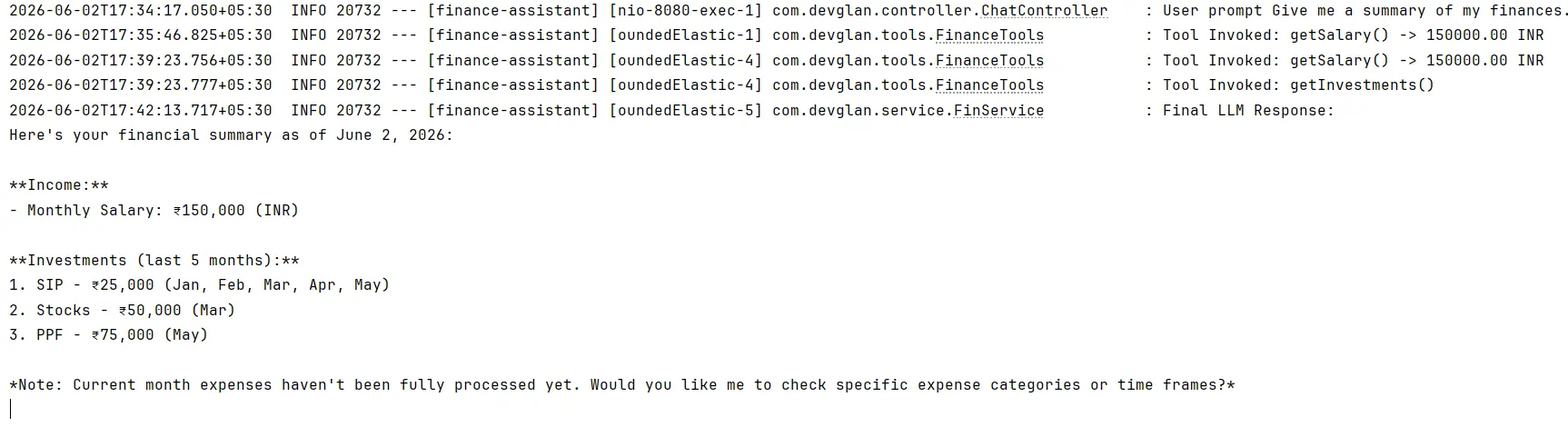
This pattern is extremely important because real-world AI agents rarely depend on a single tool.
Most enterprise assistants require:
- Customer lookup
- Order lookup
- Inventory lookup
- Payment lookup
before producing a final answer.
Your Financial Snapshot tool is an excellent example of composite tool orchestration.
Limitations of Local Models
While local models are fantastic for privacy and cost control, they have limitations.
Common issues include:
- Incorrect tool selection
- Missed parameter extraction
- Hallucinated answers
- Reduced reasoning depth
- Smaller context windows
Next Step: Agentic Finance Planner
Tool calling is the first step toward building agents.
Today our assistant can:
- Retrieve salary
- Retrieve expenses
- Retrieve investments
- Generate summaries
The next logical evolution is an Agentic Finance Planner. Imagine a user asking:
I want to save Rs.5 lakh in the next 18 months.
Create a plan.
An agent could:
- Analyze current salary.
- Analyze expenses.
- Analyze investments.
- Calculate savings potential.
- Generate monthly targets.
- Continuously track progress.
That will be the focus of the next article:
Spring AI Tool Calling vs MCP vs RAG
A common question is when to use Tool Calling, MCP, or RAG. Although they are often mentioned together, they solve very different problems. Below is the comparison:
| Capability | Tool Calling | MCP (Model Context Protocol) | RAG (Retrieval-Augmented Generation) |
|---|---|---|---|
| Primary Purpose | Execute business logic and retrieve live data | Connect models to external tools through a standard protocol | Retrieve knowledge from documents |
| Access Live Data | Yes | Yes | No |
| Invoke Actions | Yes | Yes | No |
| Works with Databases | Excellent | Excellent | Limited |
| Works with External APIs | Excellent | Excellent | No |
| Works with PDFs & Documents | Not Ideal | Not Ideal | Excellent |
| Enterprise Knowledge Search | No | No | Yes |
| Typical Data Source | Java Methods, Databases, APIs | MCP Servers & External Services | Vector Databases & Documents |
| Best Use Cases |
Customer lookups, Banking apps, Order tracking, Financial assistants |
GitHub integration, Slack integration, External tools, Multi-system connectivity |
Knowledge assistants, Documentation search, Policy Q&A, PDF chat |
| Example Question | "What is my monthly salary?" | "Create a GitHub issue for this bug." | "What does our leave policy say?" |
| Recommended for Finance Assistant | Primary Choice | Optional Future Integration | For Financial Policies & Documents |
Conclusion
Spring AI Tool Calling bridges the gap between language models and enterprise applications. In this Finance Assistant, we combined:
- Spring AI
- Ollama
- PostgreSQL
- JDBC Chat Memory
- Streaming Responses
- Tool Calling
to build a practical AI-powered finance assistant that can retrieve real financial data instead of hallucinating answers.
The complete source code can be found here on GitHub.
Once you understand tool calling, you unlock the foundation required for building agents, planners, copilots, and autonomous business workflows with Spring AI.
