

Most Spring AI examples demonstrate a chatbot that directly answers user questions or invokes a single tool. However, real-world AI agents usually perform an intermediate planning step before deciding which actions to execute.
In this article, we'll build a Personal Finance Agent using Spring AI that demonstrates several powerful capabilities including:
- Structured Output
- ChatClient
- Tool Calling
- Chat Memory
- Streaming Responses
The model first produces a structured execution plan describing what should happen before any tool execution begins. That plan is then used by the agent to drive the remainder of the conversation.
Instead of walking through every implementation detail, this article focuses on the overall architecture and how different Spring AI capabilities work together. The complete source code is available on GitHub for anyone who wants to explore the implementation further.
This architecture makes the application significantly more predictable, easier to debug, and much closer to how production-grade AI agents operate.
Traditional Tool Calling vs Planner-Based Agents
A typical Spring AI application looks something like this:
User Question -> Spring AI ChatClient -> LLM decides -> Invoke Tool(s) -> Generate ResponseFor many applications, this architecture is perfectly adequate. However, once an application starts supporting multiple tools, clarification questions, and multi-step workflows, relying entirely on the LLM's internal reasoning becomes increasingly difficult to maintain.
Instead, this project introduces a dedicated planning stage between the user's question and tool execution.
User Question -> Finance Planner -> Structured Execution Plan -> Finance Agent -> Spring AI Tool Calling -> Natural Language Response
The planner determines what needs to happen, while the Finance Agent determines how those steps should be executed.
High-Level Architecture
The following diagram illustrates the overall request flow inside the application.
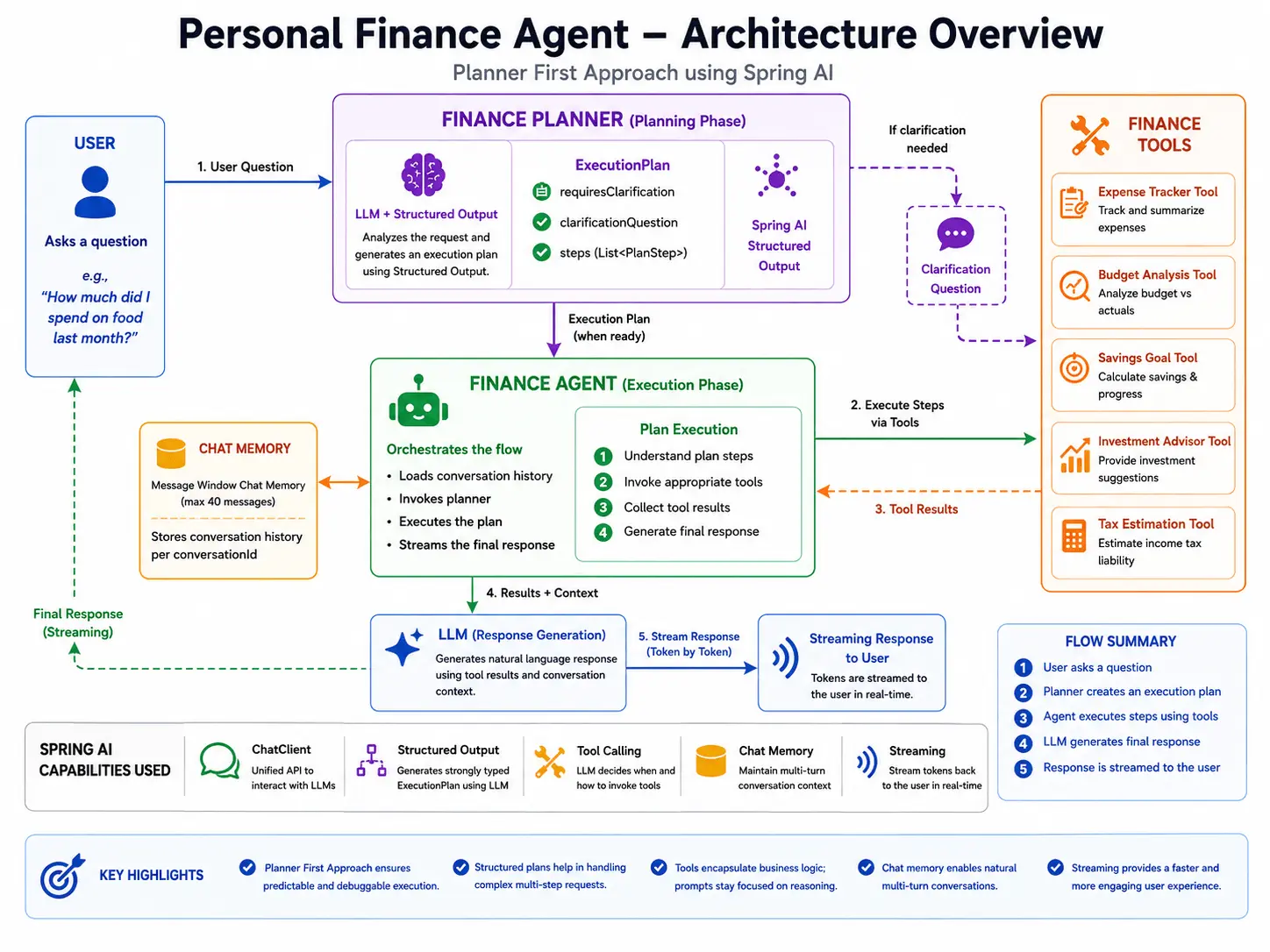
Notice that the planner does not execute any business logic. It's sole responsibility is to analyze the user's request and generate a structured representation of the work that needs to be performed.
Only after a valid execution plan has been produced does the Finance Agent begin invoking tools.
Project Structure
To keep responsibilities well separated, the application is organized into independent components. Each layer has a very specific responsibility.
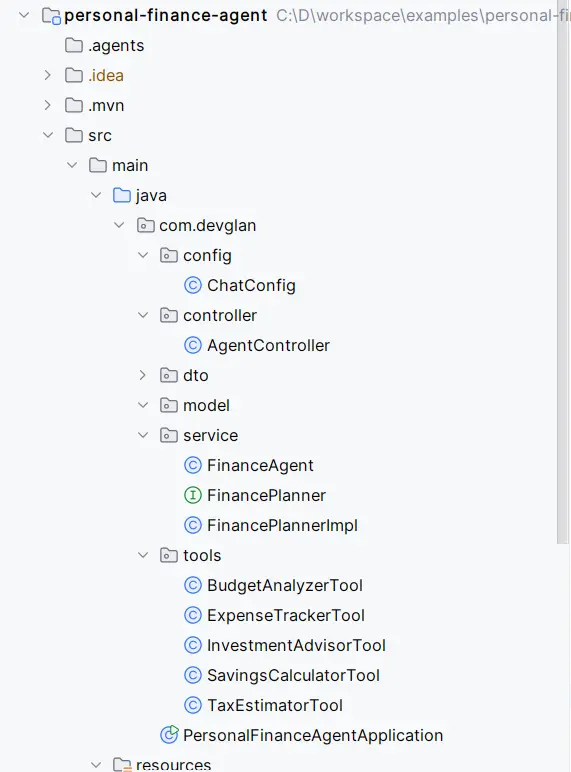
| Component | Responsibility |
|---|---|
| FinanceAgent | Coordinates the complete request lifecycle. |
| FinancePlannerImpl | Uses Spring AI Structured Output to generate an execution plan. |
| ExecutionPlan | Represents the planner's output as strongly typed Java objects. |
| PlanStep | Represents an individual action inside the execution plan. |
| Finance Tools | Expose business operations that the LLM can invoke. |
| ChatConfig | Creates and configures Spring AI's ChatClient. |
One thing I particularly like about this structure is that the planner knows nothing about tool execution, while the tools themselves know nothing about planning. This separation keeps each component focused on a single responsibility and makes the overall architecture much easier to extend.
Spring AI Capabilities Used
This project demonstrates several core features provided by Spring AI.
1. ChatClient
Everything begins with Spring AI's ChatClient. Instead of interacting with a model-specific SDK, the application communicates through Spring AI's unified abstraction.
Whether the application is generating an execution plan or producing the final conversational response, every interaction flows through the ChatClient.
This abstraction makes it easy to switch between different LLM providers without changing application logic.
@Bean
ChatClient chatClient(ChatClient.Builder builder,
BudgetAnalyzerTool budgetTool,
InvestmentAdvisorTool investTool,
SavingsCalculatorTool savingsTool,
ExpenseTrackerTool expenseTool,
TaxEstimatorTool taxTool, ChatMemory chatMemory) {

return builder
.defaultSystem("""
//System prompt
""")
.defaultTools(budgetTool, investTool, savingsTool, expenseTool, taxTool)
.defaultAdvisors(MessageChatMemoryAdvisor.builder(chatMemory).build())
.build();
}
2. Structured Output
Perhaps the most important capability used in this project is Structured Output.
Instead of asking the LLM to return free-form JSON and manually parsing it, Spring AI maps the model's response directly into Java objects.
In this application, the planner produces an ExecutionPlan containing one or more PlanStep objects.
This provides compile-time type safety while eliminating fragile JSON parsing logic.
@Override
public ExecutionPlan createPlan(String conversationContext, String userPrompt) {

return chatClient.prompt()

.system(PLANNER_PROMPT)

.user("""
Conversation context:
%s

Latest user request:
%s
""".formatted(conversationContext, userPrompt))

.call()

.entity(ExecutionPlan.class);
}
When building AI applications, structured responses are significantly more reliable than attempting to extract values from arbitrary natural language output.
3. Tool Calling
Once the planner has generated an execution plan, the Finance Agent invokes the appropriate business tools using Spring AI's Tool Calling capability.
Rather than embedding business logic inside prompts, individual finance operations are exposed as callable tools. The LLM can then decide when those tools should be invoked while the application retains complete ownership of the implementation.
This keeps prompts focused on reasoning while business rules remain inside Java code.
private Flux<ChatResponse> executePlan(ChatRequest chatRequest, ExecutionPlan plan) {
    StringBuilder responseBuilder = new StringBuilder();

    return chatClient.prompt(executionRequest(chatRequest.getQuestion(), plan))
    .advisors(a -> a.param(
    ChatMemory.CONVERSATION_ID,
    chatRequest.getConversationId()))
    .stream()
    .content()
    .doOnNext(responseBuilder::append)
    .doOnComplete(() -> log.info("Final LLM response:\n{}", responseBuilder))
    .map(chunk -> response(chatRequest, chunk));
    }
4. Chat Memory
Conversations rarely consist of a single request.
Users often ask follow-up questions.
Without remembering previous interactions, the model loses important context. Spring AI's Chat Memory allows the application to maintain conversational continuity across multiple requests, resulting in a much more natural user experience.
@Bean
ChatMemory chatMemory(ChatMemoryRepository repository) {
return MessageWindowChatMemory.builder()
.chatMemoryRepository(repository)
.maxMessages(40)
.build();
}
5. Streaming Responses
Instead of waiting for the complete response to be generated, the Finance Agent streams tokens back to the client as they become available.
Streaming significantly improves the perceived responsiveness of AI applications, especially when multiple tools or large language models are involved.
Now that we've seen the overall architecture, the next part of this article dives into the heart of the application—the Planner. We'll see how Spring AI Structured Output is used to convert natural language into a strongly typed execution plan and why this design makes the entire agent more predictable and extensible.
Building the Planner
The planner is the heart of this application.
Instead of allowing the LLM to immediately invoke tools, every user request first passes through the planner. It's responsibility is not to answer the user's question or execute business logic. Instead, it analyzes the request and converts it into a structured execution plan that the Finance Agent can understand.
This additional planning phase introduces a clear separation of concerns:
- The planner focuses on understanding what the user wants.
- The Finance Agent focuses on how to execute those actions.
- Business tools remain responsible only for implementing domain logic.
public interface FinancePlanner {

/**
* Produces a plan for the latest turn. Conversation context lets the
* planner reuse facts collected in earlier turns.
*/
ExecutionPlan createPlan(String conversationContext, String userPrompt);

}
Why Use Structured Output?
Large Language Models are exceptionally good at understanding natural language, but they naturally respond with free-form text. While that is ideal for conversations, it becomes problematic when the response needs to drive application logic.
Imagine asking the model:
"How much did I spend on groceries last month?"
If the model replies with natural language, the application still needs to determine:
- Which tool should be executed?
- Which category was requested?
- What date range should be used?
- Is there enough information to proceed?
Trying to extract those values from plain text quickly becomes fragile.
Instead, Spring AI's Structured Output allows the planner to return a strongly typed Java object. This eliminates manual JSON parsing while ensuring the application always receives data in a predictable format.
The Execution Plan
Every planning request produces an ExecutionPlan.
The Finance Agent no longer needs to interpret user intent. It simply consumes the execution plan and performs the requested steps.
Representing Individual Steps
Each action generated by the planner is represented by a PlanStep.
A plan may contain a single step, such as fetching expenses for a specific category, or it may contain multiple dependent steps for more complex requests.
For example, a request like:
"Show my total food expenses and compare them with last month."
public record PlanStep(

ToolName tool,
String reason,
boolean required,
int order

) {}
could be represented as multiple planned actions instead of a single tool invocation.
Although the Finance Agent ultimately executes these actions, the planner is responsible for determining the sequence in which they should occur.
The Planner Prompt
Like any LLM-based component, the planner is driven by a carefully designed system prompt.
Rather than asking the model to answer finance-related questions, the prompt instructs it to behave as a planning engine whose only responsibility is to generate an execution plan.
The prompt defines rules such as:
- Understand the user's financial intent.
- Determine whether clarification is required.
- Generate one or more execution steps.
- Never answer the user's question directly.
- Return a response that matches the ExecutionPlan schema.
Planning Examples
Let's look at a few examples of how the planner interprets user requests.
Example 1 - Complete Information
User request:
How much did I spend on food last month?
The planner already has all the information required to continue.
{
  "requiresClarification": false,
  "steps": [
    {
      "action": "...",
      "tool": "...",
      "parameters": {
      }
    }
  ]
}
The Finance Agent can immediately begin executing the generated plan.
Example 2 - Missing Information
Now consider a much shorter request.
How much should I invest to build a corpus of 50 lakhs.
This request leaves several important questions unanswered.
- What is your income and expenses?
- In how many years you want to build this corpus?
Instead of guessing, the planner marks the request as incomplete.
{
    "requiresClarification": true,
    "clarificationQuestion": "..."
}
The Finance Agent simply relays the clarification request back to the user and waits for the next message.
No business tools are executed until enough information has been collected.
This ability to decompose complex requests into smaller executable steps is one of the biggest advantages of introducing an explicit planning layer.
Why Separate Planning from Execution?
At first glance, using two LLM interactions instead of one may seem unnecessary.
However, the separation provides several practical advantages.
| Without Planner | With Planner |
|---|---|
| LLM decides everything internally. | Execution logic becomes explicit. |
| Difficult to debug reasoning. | Execution plans can be inspected. |
| Clarification logic mixed with tool execution. | Clarification handled before any tools run. |
| Business logic gradually moves into prompts. | Business logic remains inside Java services. |
| Complex workflows become unpredictable. | Execution remains deterministic. |
For small chatbot applications this additional layer may not be necessary.
However, as soon as multiple tools, workflows, and clarification scenarios are introduced, separating planning from execution results in a much cleaner architecture.
Building the Finance Agent
So far we've focused on the planning phase, where the user's request is converted into a structured ExecutionPlan. The next step is to execute that plan and generate a conversational response.
This responsibility belongs to the FinanceAgent, which acts as the central orchestrator of the application.
The Finance Agent itself doesn't perform any financial calculations. Instead, it coordinates planning, tool execution, and conversation history while allowing each component to remain focused on a single responsibility.
Orchestrating the Request Flow
The entry point into the application is the chat() method inside FinanceAgent. Its responsibility is surprisingly small:
- Build conversation context.
- Ask the planner to generate an execution plan.
- Return a clarification question if required.
- Otherwise execute the generated plan.
The following snippet illustrates the core workflow.
ExecutionPlan plan = financePlanner.createPlan(
        conversationContext(chatRequest.getConversationId()),
        chatRequest.getQuestion());

if (plan.needsClarification()) {
    String clarification = clarificationQuestion(plan);
    return Flux.just(response(chatRequest, clarification));
}

return executePlan(chatRequest, plan);
Notice how the Finance Agent never tries to understand the user's request itself. That responsibility belongs entirely to the planner.
This is one of the biggest architectural improvements over a traditional chatbot. Every request follows the same deterministic lifecycle regardless of how many tools are available.
Executing the Plan
Once a valid execution plan has been generated, the Finance Agent delegates execution to Spring AI's ChatClient.
Instead of sending only the user's question, the agent sends both:
- the original user request
- the internally generated execution plan
This allows the language model to understand both what the user asked and how the application expects it to be executed.
return chatClient.prompt(executionRequest(chatRequest.getQuestion(), plan))
        .advisors(a -> a.param(
                ChatMemory.CONVERSATION_ID,
                chatRequest.getConversationId()))
        .stream()
        .content();
Even though only a few lines of code are required, several Spring AI capabilities are working together behind the scenes:
- Conversation memory
- Tool calling
- Prompt construction
- Streaming responses
Leveraging Spring AI Tool Calling
One of the most powerful features provided by Spring AI is Tool Calling.
Instead of asking the LLM to perform financial calculations itself, domain-specific operations are implemented as Java tools that the model can invoke whenever required.
The application currently exposes tools for several finance-related tasks:
- Expense Tracking
- Budget Analysis
- Savings Goal Calculation
- Investment Advice
- Tax Estimation
These tools are registered once while configuring the application's ChatClient.
@Component
public class InvestmentAdvisorTool {

    @Tool(name = "INVESTMENT_ADVISOR", description = """
        Suggest investment options based on risk profile and available surplus.
        Returns recommended allocation across equity MF, debt MF, FD, and gold.
        """)
    public String suggestInvestments(
            @ToolParam(description = "Monthly investable surplus in INR") double surplus,
            @ToolParam(description = "Risk appetite: conservative, moderate, or aggressive") String riskProfile
    ) {
        return switch (riskProfile.toLowerCase()) {
            case "aggressive" -> buildAllocation(surplus, 0.70, 0.15, 0.10, 0.05);
            case "moderate"   -> buildAllocation(surplus, 0.50, 0.25, 0.15, 0.10);
            default           -> buildAllocation(surplus, 0.20, 0.40, 0.30, 0.10);
        };
    }
    }
This is one of my favorite aspects of Spring AI.
Once a tool is registered, the LLM can decide when it should be invoked without requiring additional routing logic inside the application.
Business logic remains inside Java classes rather than being embedded inside prompts. Prompts focus on reasoning while tools focus on implementation.
Conversation Memory
Financial conversations are rarely completed in a single message. Instead of manually storing previous messages, Spring AI provides a built-in ChatMemory abstraction.
This project configures a message window memory backed by a repository.
@Bean
ChatMemory chatMemory(ChatMemoryRepository repository) {
    return MessageWindowChatMemory.builder()
            .chatMemoryRepository(repository)
            .maxMessages(40)
            .build();
}
Streaming the Response
Another capability used by the application is response streaming.
Rather than waiting for the complete answer to be generated, tokens are streamed back to the client as they become available.
- multiple tools are executed,
- the prompt is large, or
- the LLM requires additional reasoning time.
Spring AI makes this almost effortless.
.stream()
.content()
Despite the simplicity of the API, users immediately begin seeing the response instead of waiting for the entire generation to complete.
Running the Application
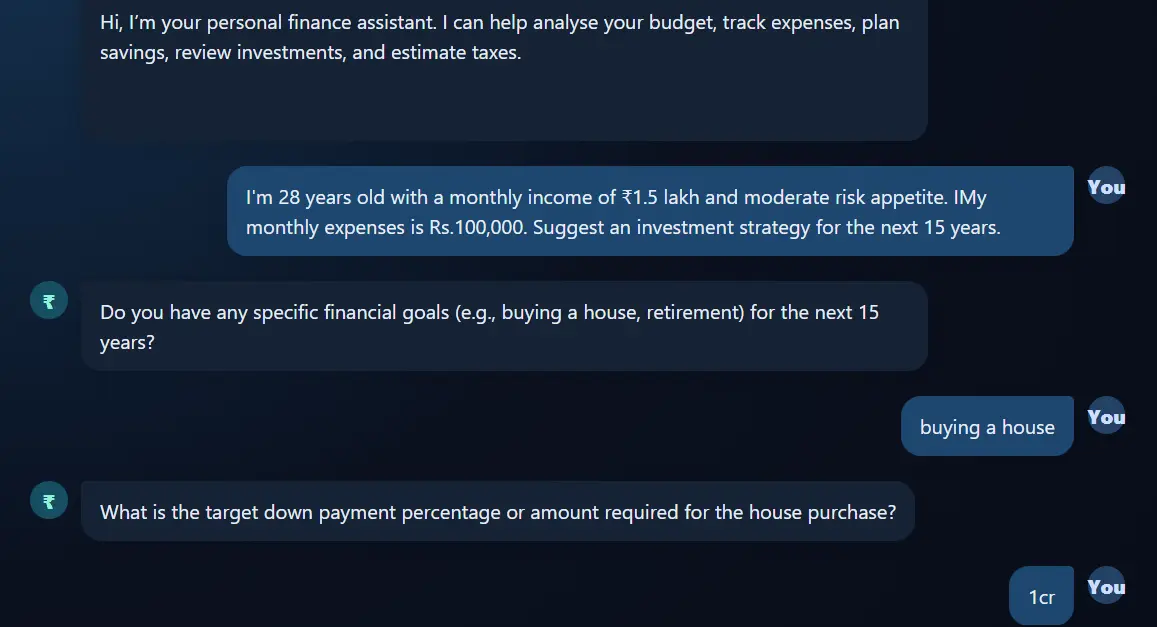
Once the application is running, interacting with the Finance Agent feels like chatting with a knowledgeable financial advisor.
Some example prompts include:
- Analyze my monthly budget.
- I earn Rs.1,20,000 and save Rs.25,000 every month. How long will it take to accumulate Rs.10 lakhs?
- Suggest an investment plan for a moderate risk profile.
- Estimate my income tax for this financial year.
- How much did I spend on entertainment during the last three months?
This consistent workflow makes the application predictable regardless of how many tools are eventually added.
Extending the Agent
One of the biggest benefits of separating planning from execution is extensibility.
Suppose we later decide to add a Loan Eligibility Tool or a Retirement Planning Tool.
The existing architecture remains unchanged.
- Create a new Spring AI Tool.
- Register it with the ChatClient.
- Update the planner instructions if necessary.
The Finance Agent itself doesn't need to know how the new feature works. It simply continues orchestrating execution plans in exactly the same way.
This makes the architecture easy to evolve as new capabilities are introduced.
Conclusion
Spring AI provides far more than a simple chatbot abstraction.
By combining Structured Output, Tool Calling, Chat Memory, and Streaming Responses, we can build AI applications that behave much more like intelligent software agents than conversational assistants.
The key architectural decision in this project is introducing an explicit planning phase before any tool execution occurs.
Instead of relying entirely on the language model's internal reasoning, the planner produces a structured execution plan that becomes the contract between user intent and business logic.
Although this article demonstrates the approach using a Personal Finance Agent, the same architecture can be applied to customer support assistants, HR copilots, travel planners, code review agents, healthcare assistants, and many other AI-powered applications.
