

"Cereal is a soup."
"Pineapple belongs on pizza."
"Mornings are overrated."
Few things spark a comment section like a confidently stated unpopular opinion, which is exactly why this format keeps going viral. The best videos are playful, bold, and perfectly paced, and they invite viewers to defend their own take. Producing them with polished visuals used to need editing skills and a lot of time.
The best AI video generator gives you a faster path. Dreamina lets you turn a single reference image and a sharp opinion into a video that is built to start friendly debates. Here is how to craft opinion videos that spark conversation without starting fights.

Why unpopular opinions travel fast
An unpopular opinion invites a reaction. Viewers who disagree want to say so, while those who agree feel seen. Both reactions drive comments, shares, and replays, which social platforms reward heavily.
Picking an opinion that is fun, not harmful
The best opinions are low stakes and light-hearted. Choose topics where everyone can have a laugh, even when they disagree.
- Food and drink preferences
- Movie, music, and book takes
- Everyday habits and routines
- Travel, weather, and holiday preferences
Stating the opinion with confidence
Deliver the opinion clearly and early, in a single bold line. Confidence is part of the entertainment, and a straight-faced delivery makes the idea funnier. Avoid hedging, since viewers enjoy a creator who commits.
Backing it up with ridiculous logic
After the opinion comes the defense. Offer a few playful arguments, each slightly more absurd than the last. The comedy lies in the earnest effort, and viewers will enjoy picking apart your reasoning in the comments.
Choosing visuals that support the argument
Props, expressions, and setting amplify the opinion. A creator pointing to a cereal bowl, or a dramatic freeze when a rival opinion appears, gives the audience something fun to watch. Keep the frame simple and the energy high.
Inviting responses without picking fights
End with a clear invitation to respond, such as "Tell me I am wrong." A friendly tone signals that disagreement is welcome, and it keeps discussions positive. Avoid targeting individuals or groups.
Your opinion video in three steps
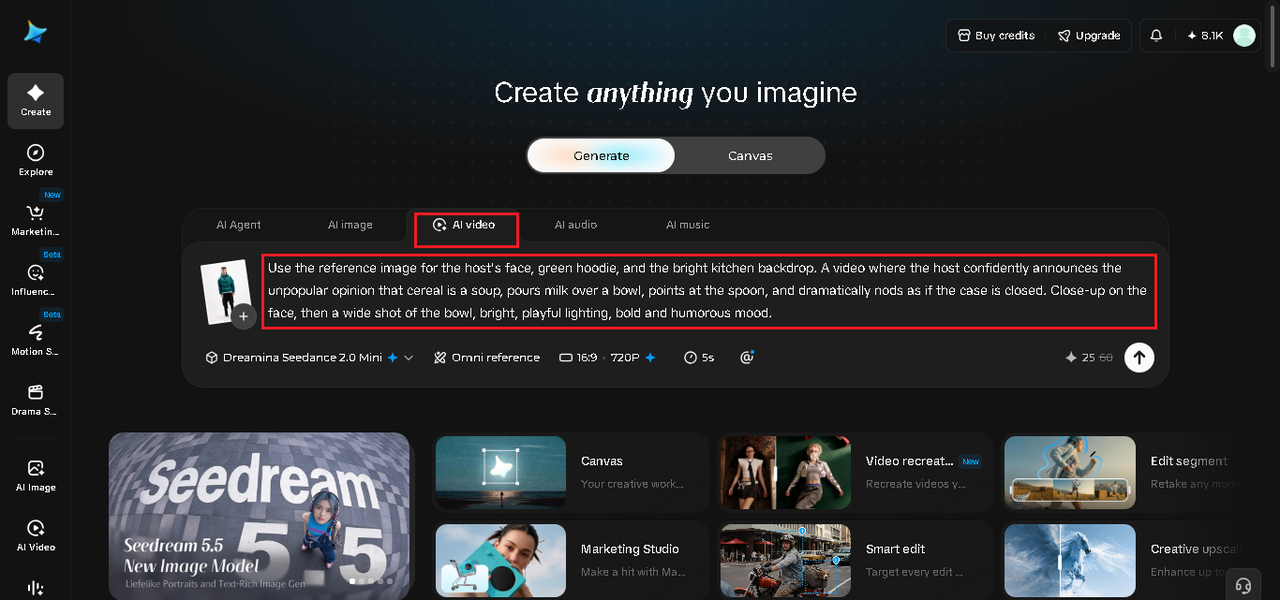
Step 1: Upload reference image and write corresponding prompt
Visit Dreamina and sign in, then head to the "AI Video" section. Click "Add reference image" to upload your photo, then add your prompt to describe the video. In your prompt, state what to reference from the image, such as the host's face, the green hoodie, and the kitchen backdrop.
Sample prompt for a video: Use the reference image for the host's face, green hoodie, and the bright kitchen backdrop. A video where the host confidently announces the unpopular opinion that cereal is a soup, pours milk over a bowl, points at the spoon, and dramatically nods as if the case is closed. Close-up on the face, then a wide shot of the bowl, bright, playful lighting, bold and humorous mood.
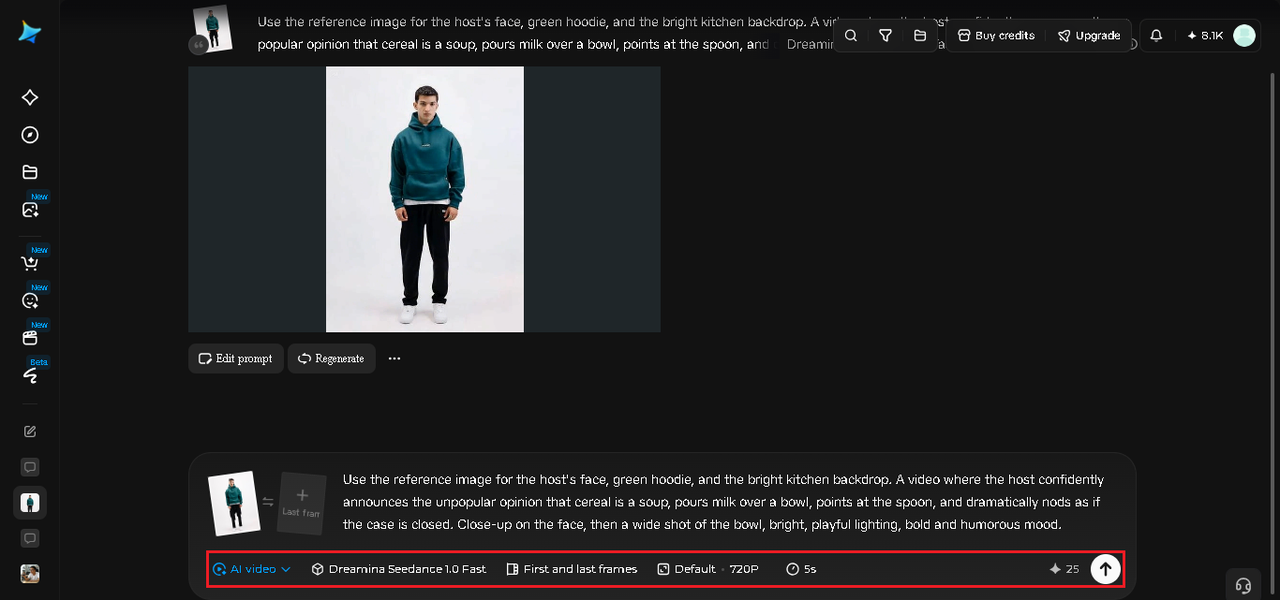
Step 2: Generate your video
After adding your image and prompt, choose the Seedance 2.5 model for the generation. Next, choose the video length, then a suitable aspect ratio, picking 16:9 for YouTube or 9:16 for TikTok. Finally, click Dreamina's icon and wait a few seconds for processing.
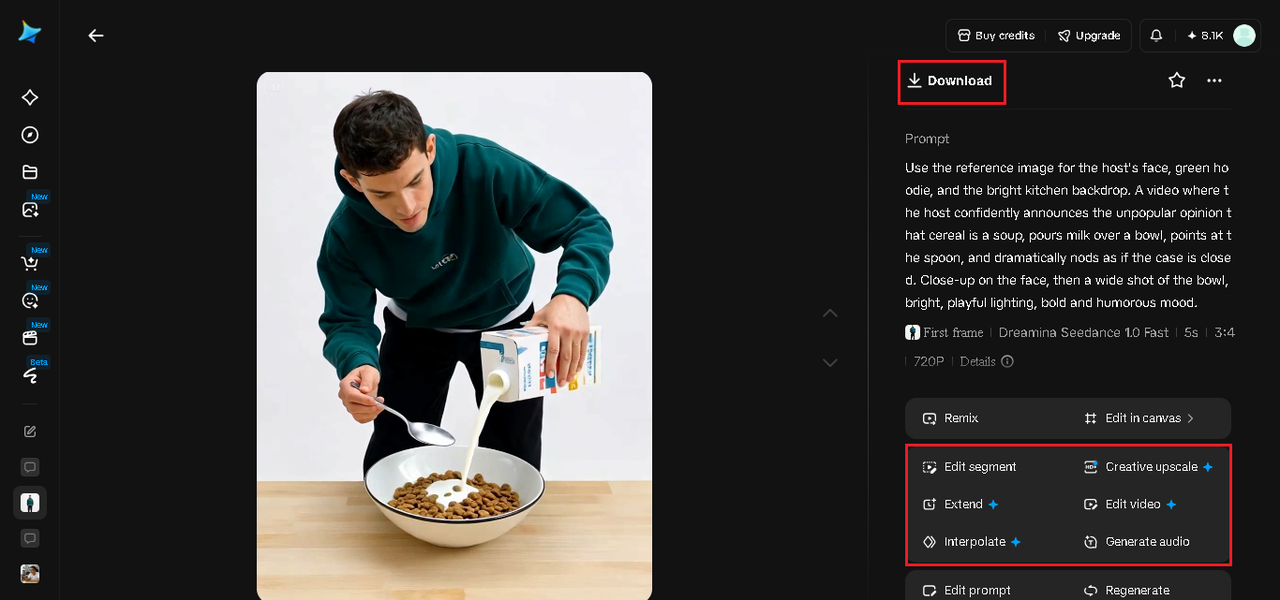
Step 3: Enhance and export the video
Polish your video before saving it with Dreamina's AI editing tools. Use advanced tools like Upscale for higher resolution or Generate soundtrack for adding audio. Finally, export your video and share it on social media platforms.
Seedance 2.5 features for opinion videos
Seedance 2.5 is the video model you select in Dreamina, and several features fit this format.
-
Reference image guidance: your photo anchors the host, outfit, and setting.
-
Prompt following: it interprets descriptions of expressions, gestures, and pacing.
-
Draft mode: Seedance 2.5 Draft mode lets you test a delivery style quickly before generating the final video.
-
Length and ratio control: choose a duration and a 9:16 or 16:9 frame.
Using text and graphics to emphasize the take
A bold on-screen title such as "Unpopular opinion" tells viewers what is coming. A big, simple caption for the opinion makes it easy to read and share. Consistent styling gives your series a recognizable look.
Timing the reveal of the opinion
Where you place the opinion matters. Opening with it creates instant intrigue, while building up to it creates suspense. Test both approaches in your series and see which style your audience prefers.
Responding to comments with follow-ups
Comment sections are a goldmine. Feature the best responses in follow-up videos, and thank people for their takes. A creator who engages builds community and keeps the conversation going.
Staying kind and thoughtful
Avoid opinions that put down people or communities, and steer clear of sensitive topics. Fun, harmless debates are easier to share and more welcoming. Label AI-generated characters where platforms require it.
Where these videos perform best
-
TikTok and Instagram Reels for debate-driven content
-
YouTube Shorts for opinion series
-
Brand accounts that want a playful, conversational voice
-
Podcast clips that tease a hot take
Testing which opinions land best
Not every take performs equally, so treat your first few videos as experiments. Post a handful of opinions across different topics, then compare which ones earn the most comments and replays. Over time you will learn whether your audience prefers food debates, lifestyle takes, or entertainment opinions.
-
Track comments, shares, and watch time for each topic
-
Keep the strongest performers as recurring themes
-
Retire topics that generate confusion rather than conversation
Start a friendly debate
An unpopular opinion is a conversation starter wrapped in a punchline. With Dreamina and Seedance 2.5, you can turn your boldest takes into polished videos in minutes, and you can start creating yours today.
❤️ Liked this article?
If it saved you time, consider buying me a coffee to support future improvements.
About The Author
